Swedish Crossword Puzzle, Built from Scratch in Java
A complete redesign of the Swedish-style crossword as a Java Swing desktop game — 19 classes, 2 interfaces, 2 enums, structured as a study in clean OOP.
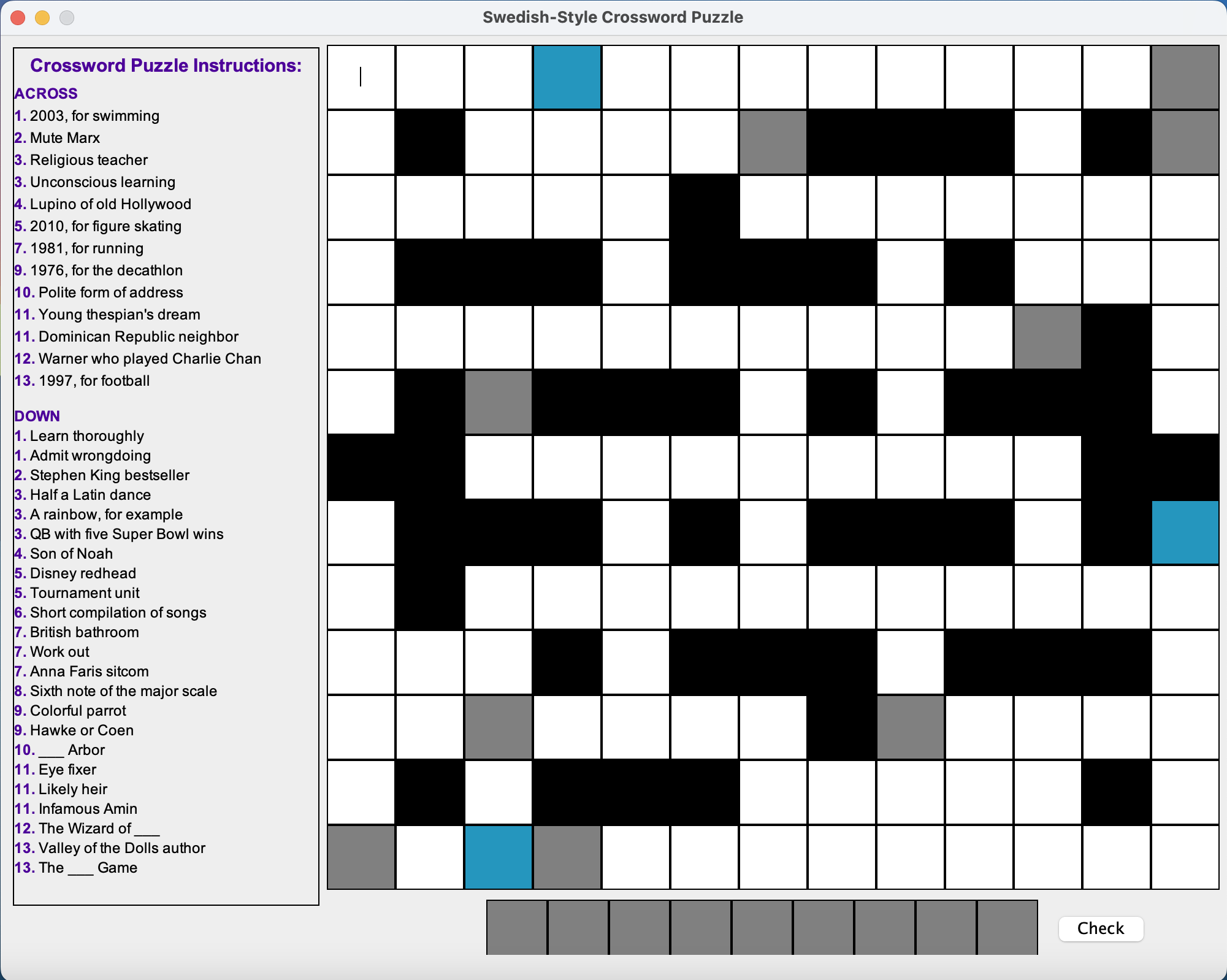
A Swedish-style crossword is the variant you see in Scandinavian newspapers: clues live inside the grid as little inset boxes — no separate numbered clue list. Highlighted squares spell out a hidden phrase at the bottom. It is compact, self-contained, and surprisingly fiddly to build well.
This project rebuilds one from scratch in Java Swing as a single-player desktop game. The point is not the crossword itself — it is the architecture: how a deliberately small problem can be a vehicle for every core OOP idea, applied in earnest rather than as a textbook exercise.
The game, in motion
The whole game is a single JFrame composed of three panels — clues on the left, the playing grid in the centre, and a solution row at the bottom with a Check button — plus a floating on-screen keyboard that only appears when you click a square.
Anatomy of the board: four kinds of square
Most of the design pressure lives in the squares themselves. The grid is uniform on the outside but heterogeneous on the inside: each cell is a small state machine with its own colour, its own legal letters, and its own keyboard.
The blue squares carry the most interesting trick. Each one offers a tiny keyboard with only four random letters and the correct letter enabled — a soft hint. To stop the hint from re-rolling every click, each blue cell stores its enabled-key set as metadata on a TextBoxInfo object the first time it appears, and reuses that set thereafter.
From a text file to a playable game
Boards are not hard-coded. The game reads a small .txt file that describes the grid, the clues, and the solution phrase. A welcome window lets the user pick a puzzle, and a single utility class parses the file and hands a fully-built GameUI to Swing’s event-dispatch thread.
FileChooserUI writes the chosen file path into a Config properties bag, InfoExtractor reads it back and builds the model, then GameUI assembles the three panels on Swing's event-dispatch thread.Three packages, three responsibilities. Nothing crosses lanes — keyboards never know about file paths, panels never parse text, the utility package never imports Swing widgets it does not need.
One keyboard at a time
The visible game has a small invariant that turned out to be the hardest part to enforce: only one on-screen keyboard exists at any time. Click a square, the keyboard appears. Click a different square, the old keyboard disappears before the new one shows up — even though Swing has happily allowed both to exist.
The first version of the code created keyboards but never disposed of them, so they piled up on the screen. The fix was to put a single onscreenkeyboard reference on the TextBoxListener. Whenever a click fires, that field is checked, the old window is disposed, and the new one is created and parked in the same slot.
TextBoxListener is what makes this clean instead of leaking windows on every click.An abstract TextBox, four concrete faces
The four square types are unified by an abstract base class. TextBox is responsible for the things every square shares — building the JTextField, exposing a hook for post-construction customisation (afterEffects), and reporting its own kind. Each subclass overrides only what makes it unique: colour, editability, and what kind of keyboard it summons on click.
Two small details made this design pay off in practice:
TextBoxInfoinstead of bareJTextField— a wrapper that pairs the swing component with itsTextBoxType, so the listener layer can route to the right keyboard with a single enum lookup. Without it, every listener would need to know about every subclass.tbToKeyboardMapinTextBoxListener— aHashMap<TextBoxType, KeyboardType>. Adding a new square type later becomes one row in the map, not a new branch in a switch statement scattered across files.
OOP, applied — not performed
The original version of this code was six classes, mostly public fields, and one mega-class. The redesign was a deliberate effort to apply OOP principles where they actually do work, not as decoration:
| Concept | Where it lives |
|---|---|
| Abstraction | TextBox defines what every square is without saying what each does. |
| Inheritance | Four *Textbox subclasses; RandomKeyboard extends PlainKeyboard. |
| Encapsulation | Fields downgraded from public to private; protected where subclasses genuinely need access. |
| Polymorphism | SquarePanel iterates TextBox[] without knowing concrete types; afterEffects() is dispatched dynamically. |
| Composition over inheritance | TextBoxInfo wraps a Swing field with metadata rather than subclassing the Swing field itself. |
| Single responsibility | Three packages (ui, functionality, utility); 19 classes, none larger than a few dozen lines. |
| Open/closed | Add a new square type by writing one class and adding one map entry — no existing class changes. |
The end result is a codebase that fits on a single screen mentally: a parser, a model, three panels, a listener pair, and two keyboards. Time and space complexity are both O(N×M) in the grid size — there is no global state to keep in sync, no caches to invalidate.
What I would do next
A few extensions the architecture is ready for, none of which require touching the core:
- Dark mode, by adding a sibling theme on top of the existing palette helpers — every UI class already reads its colours from one place.
- Animated reveals for the solution row, gated behind a flag on
SolutionListener. - Save & resume via serialising the
TextBoxInfo[]array — the entire game state already lives in one place. - A second keyboard layout (QWERTY) — drop in a new
KeyboardTypeenum value, ship a new subclass ofPlainKeyboard, and the listener picks it up automatically.
The point of all of this, in the end, is not the crossword. It is the discipline of treating a small problem as if it were a large one — drawing the package boundaries, writing the abstract class, picking the listener that holds the single mutable reference — so that when the problem actually does grow, none of the early decisions have to be undone.